1

Windows Migration Technician Jobs (NOW HIRING)

PROLIM (www.prolim.com) is currently seeking Support Technician 3 for one of our top Client for ... Backup and disaster recovery strategies for RHEL and Windows systems. * Post-migration system ...

Network Technician

Bronx, NY · On-site

$45K - $53K/yr

Support migration of desktops, laptops, and network-connected devices. * Perform wireless surveys ... Support Microsoft Office applications in both Windows and Mac environments. * Build positive ...

... M365) domain migration effort. This role is part of a Command Center / cutover support model ... Windows enterprise environment • 2+ years using an enterprise ticketing system • Enterprise ...

... M365) domain migration effort. This role is part of a Command Center / cutover support model ... Windows enterprise environment • 2+ years using an enterprise ticketing system • Enterprise ...

next page

Showing results 1-20

Windows Migration Technician information

See salary details

$15

$19

$27

How much do windows migration technician jobs pay per hour?

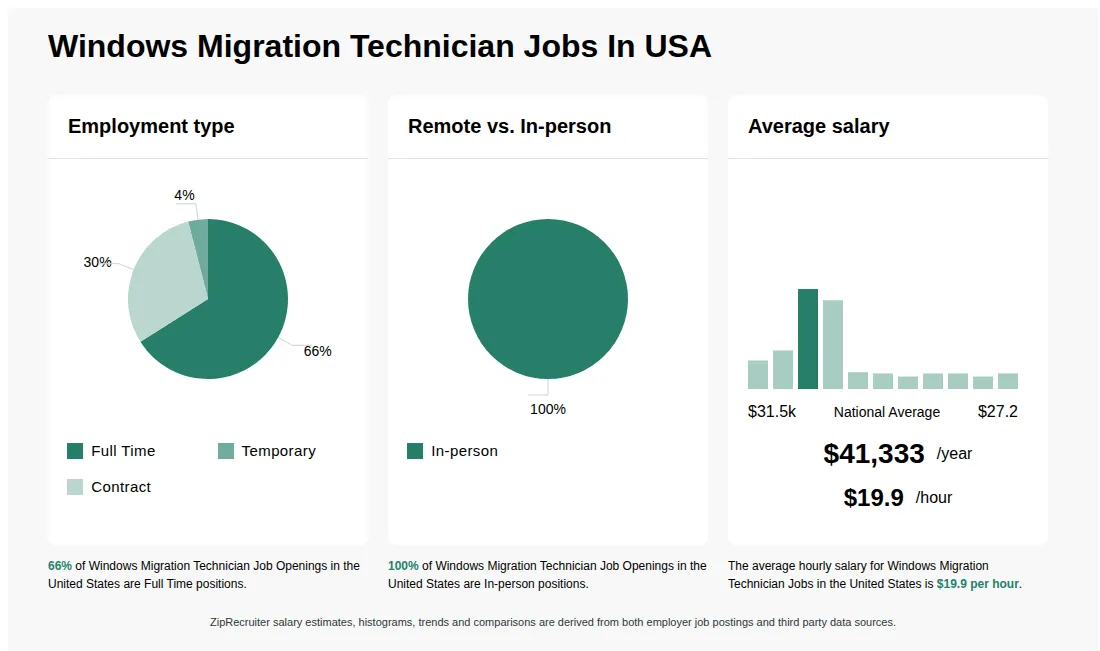
As of Jun 15, 2026, the average hourly pay for windows migration technician in the United States is $19.87, according to ZipRecruiter salary data. Most workers in this role earn between $17.55 and $21.63 per hour, depending on experience, location, and employer.

What are Windows Migration Technicians?

Windows Migration Technicians are IT professionals who specialize in transferring data, applications, and settings from older versions of Microsoft Windows operating systems to newer ones. Their responsibilities include planning and executing the migration process, troubleshooting compatibility issues, and ensuring that user data is preserved and secure. They may work with individual computers or large enterprise networks and are often involved in upgrading hardware or integrating new technologies. Their expertise helps organizations minimize downtime and avoid data loss during system upgrades.

What Is the Job of a Windows Migration Technician?

The job duties of a windows migration technician revolve around migrating a company’s computer systems to the newest version of Microsoft Windows. Your responsibilities include installing a new operating system and platform and upgrading applications and desktop systems within the company’s network. You must test the compatibility of existing PC software and provide fixes or alternatives if necessary. Most Windows migration technicians also provide post-migration support to help employees with the new operating systems, troubleshoot when issues arise, and offer computer skills training when necessary.

What are the key skills and qualifications needed to thrive as a Windows Migration Technician, and why are they important?

To thrive as a Windows Migration Technician, you need a solid understanding of Windows operating systems, experience with device imaging, and a background in IT support or a related technical field. Familiarity with migration tools such as Microsoft Deployment Toolkit (MDT), Windows Assessment and Deployment Kit (ADK), and Active Directory, as well as relevant certifications like CompTIA A+ or Microsoft Certified: Modern Desktop Administrator Associate, is highly beneficial. Attention to detail, problem-solving abilities, and effective communication are crucial for managing migration tasks and supporting end-users. These skills ensure smooth transitions, minimize downtime, and maintain productivity during system upgrades or migrations.

What is the difference between Windows Migration Technician vs Desktop Support Specialist?

AspectWindows Migration TechnicianDesktop Support Specialist
CertificationsCompTIA A+, Microsoft Certified: Modern Desktop AdministratorCompTIA A+, HDI Support Center Analyst
Work EnvironmentData centers, corporate IT departments, migration projectsEnd-user offices, help desks, troubleshooting
Industry UsageIT services, enterprise IT, consulting firmsIT support, corporate, healthcare, education

While both roles involve supporting computer systems, a Windows Migration Technician specializes in transferring and upgrading Windows environments during migrations, focusing on data integrity and system compatibility. In contrast, a Desktop Support Specialist provides ongoing technical support for end-users, troubleshooting hardware and software issues. Understanding these differences helps organizations assign the right skills for migration projects versus daily support tasks.

What are some common challenges faced during large-scale Windows migration projects, and how can a Windows Migration Technician address them?

One common challenge is ensuring minimal downtime while migrating user data and applications to new Windows environments. Compatibility issues between legacy software and the latest Windows versions can also arise. Windows Migration Technicians can address these by thoroughly assessing existing systems, running pilot migrations, and maintaining clear communication with end-users to schedule migrations at optimal times. Collaborating closely with IT support, project managers, and end-users is essential to troubleshoot issues quickly and ensure a smooth transition.
What cities are hiring for Windows Migration Technician jobs? Cities with the most Windows Migration Technician job openings:
What are the most commonly searched types of Windows Migration Technician jobs? The most popular types of Windows Migration Technician jobs are:
What states have the most Windows Migration Technician jobs? States with the most job openings for Windows Migration Technician jobs include:
What are popular job titles related to Windows Migration Technician jobs? For Windows Migration Technician jobs, the most frequently searched job titles are:
Infographic showing various Windows Migration Technician job openings in the United States as of June 2026, with employment types broken down into 6% As Needed, 24% Full Time, 64% Part Time, and 6% Contract. Highlights an 76% Physical, 8% Hybrid, and 16% Remote job distribution, with an average salary of $41,333 per year, or $19.9 per hour.
Idaho - COURTS(AOC) - Data Migration Field Support Technician

Idaho - COURTS(AOC) - Data Migration Field Support Technician

Inteletech Global, Inc.

Boise, ID • On-site

Full-time

Posted 12 days ago


Job description

The Data Migration Field Support Technician performs a variety of duties including, but not limited to, new hardware deployments, portable and remote devices; all peripheral devices; data migration of emails and documents to central M365 tenant.
General Position Summary:
The Data Migration Field Support Technician supports data migration efforts for the Idaho Supreme Court in the trial courts. The position is located based in Boise, Idaho and requires the resource to be fully onsite for the role.
How We Work:
The Administrative Office of the Courts is committed to supporting the mission of the Idaho Courts through the use of an agile approach that aligns strategy, work, and capacity. This approach empowers our employees to respond quickly and efficiently to meet the needs of our customers: citizens, courts, judges, employees, and other stakeholders. We believe in continual improvement of our services and products to better serve and support our customers and the evolving environment. Employees are future-focused, take initiative, and are personally responsible for work delivery and professional growth. Our leaders are committed to professional development and growth of employees by empowering and supporting motivated individuals; providing clarity and focus for projects; giving those individuals the environment and support they need; and fostering a culture of collaboration, transparency, learning, trust and shared accountability.
Major Duties and Responsibilities: (The examples provided do not cover all of the duties which the incumbent of this position may be required to perform.)
  • Understands court processes to ensure that problem solutions match user needs in an appropriate manner.
  • Work closely with IT leadership and district court leadership to prioritize daily tasks and projects while providing responsive and timely end-user customer support.
  • Performs installation, configuration, and troubleshooting of standard user desktop/laptop computing hardware, printers and peripheral devices in accordance with IT procedures.
  • Coordinates and/or migrates customer data and information from decommissioned devices to new equipment.
  • Installs, configures, and maintains software on mobile devices.
  • Works with IT colleagues to assist in coordinating equipment shipments and receivables as well as processing surplus equipment in accordance with Court procedures.
  • Informs inventory system by keeping up-to-date and accurate records of serialized asset information.
  • Works closely with court staff and local administration with office moves, adds, and changes as required.
  • Corresponds with users and staff concerning issue status, resolution, and task completion.
  • Escalates issues are to other members of the technical services team as appropriate.
  • Collaborates with IT staff to test, troubleshoot and validate new hardware and applications.
  • Attends meetings as required.

Minimum Qualifications:
The Idaho Courts reserve the right to consider an equivalent combination of education, training, and/or experience necessary to successfully perform the major responsibilities of the position.
Education and Experience:
  • Three years of IT support experience.
  • Bachelor's Degree preferred.

Knowledge, Skills, and Abilities:
• Experience onboarding new users to Microsoft 365, with emphasis on Sharepoint, OneDrive, and Outlook as well as answering general user questions;
• Experience migrating end user emails and documents to Outlook and OneDrive;
• Experience with troubleshooting and maintaining Windows Active Directory users, computers and policies, preferred;
• Experience troubleshooting with Microsoft Windows 10;
• Experience troubleshooting Microsoft Office 2016, including exporting/importing mail, calendar and contacts;
• Experience with basic network (wired and wireless) configuration and troubleshooting including ping and trace route, preferred;
• Knowledge of court processes and court information systems preferred;
• Skill in providing excellent customer service;
• Ability to travel throughout the state as needed;
• Ability to communicate effectively verbally and in writing;
• Ability to understand impacts of software, system, or application changes on customers;
• Ability to prioritize and address customer questions and trouble tickets based on customer needs and impacts;
• Ability to work independently.
Required/Desired Skills
SkillRequired /DesiredAmountof ExperienceCustomer service including the ability to prioritize and address customer questions and trouble tickets based on customer needs and impacts.Required3YearsTroubleshooting and maintaining Active Directory users, computers, groups and policies.Nice to have2YearsOnboarding new users to Microsoft 365, with emphasis on Sharepoint, OneDrive, and Outlook as well as answering general user questionsRequired2YearsMigrating end user emails and documents to M365 Outlook and OneDrive from on-premise Exchange, external M365 and/org Google Workspace.Required2YearsTroubleshooting Microsoft Windows 10 and 11.Highly desired2YearsTroubleshooting Microsoft Office 2016, including exporting/importing mail, calendar and contactsHighly desired2YearsBasic network (wired and wireless) configuration and troubleshooting including ping and trace routeNice to have1YearsExcellent communication and interpersonal skills are critical in this role.Required0
Questions
No.QuestionQuestion1Absences greater than two weeks MUST be approved by CAI management in advance, and contact information must be provided to CAI so that the resource can be reached during his or her absence. The Client has the right to dismiss the resource if he or she does not return to work by the agreed upon date. Do you agree to this requirement?Question2What is your candidate's email address?Question3Have you completed and submitted the Right to Represent form, making sure to do so exactly as instructed? The form is located at https://www.cai.io/media/documents/msp/id/idaho_e-rtr_template.doc.Question4Candidates submitted above the hourly Vendor Rate of $41.37 will not be considered. Do you agree to this requirement?Question5Respond to this question with a link to your candidate's LinkedIn Profile. Question6Position is based out of Boise office and selected candidate MUST be onsite daily in that Boise office for work. Because of this, candidates local to Boise will be preferred. Please confirm you have discussed the fully onsite requirement with your candidate and the candidate accepts this requirement.Question7Please SPECIFY the CITY and STATE in which your candidate is CURRENTLY located (if not specified or if location specified is determined to be untrue at any point during the screening/interview/onboarding process - INCLUDING DURING BACKGROUND CHECK WHICH WILL CONFIRM TRUE ADDRESS - your candidate will not be considered/will be removed from consideration for the position). Question8All work history and education listed on resume will be verified during the background check process for your candidate. Please confirm you and the candidate understand this and information presented on resume is true and accurate. Question9All candidates submitted MUST be able to attend an IN-PERSON interview at the client location if selected to interview. Video interviews will not be considered. Please confirm you have discussed this with your candidate and they are able to make an in-person interview if selected by the client for an interview. Question10Please prepare your candidate that they may receive a screening call from someone at CAI at any point between the time of submittal through close of business, Friday, 4/17, to discuss their qualifications for this position. Please MAKE SURE THEY ARE PREPARED FOR THIS CALL and are PREPARED TO GIVE US YOUR COMPANY's NAME as the vendor that submitted them for this position. Please confirm you have discussed this with them and they will be prepared for a potential screening call from CAI.