2

Remote Desktop Support Jobs in Texas (NOW HIRING)

Showing results 21-40

Remote Desktop Support information

See Texas salary details

$9

$25

$42

How much do remote desktop support jobs pay per hour?

As of Sep 14, 2026, the average hourly pay for remote desktop support in Texas is $25.15, according to ZipRecruiter salary data. Most workers in this role earn between $19.28 and $28.65 per hour, depending on experience, location, and employer.

What is remote desktop support?

Remote desktop support jobs involve assisting users with technical issues related to their computers and software, typically from a remote location. Professionals in this role use specialized tools to access users’ devices, diagnose problems, and resolve issues such as software errors, connectivity problems, or system updates. They often provide guidance over the phone, chat, or email, helping users navigate technical challenges without needing to be physically present. These roles are commonly found in IT departments, managed service providers, or helpdesk environments. Remote desktop support is essential for businesses with distributed teams or clients needing timely technical assistance.

What are the key skills and qualifications needed to thrive as a remote desktop support specialist?

To thrive as a Remote Desktop Support specialist, you need strong troubleshooting abilities, a solid understanding of computer hardware/software, networking fundamentals, and typically a relevant IT certification such as CompTIA A+ or Microsoft Certified: Modern Desktop Administrator Associate. Familiarity with remote desktop tools (e.g., TeamViewer, Remote Desktop Protocol), ticketing systems, and knowledge base platforms is essential. Excellent communication, patience, and problem-solving skills help you effectively assist users and manage technical challenges remotely. These skills ensure timely and effective resolution of technical issues, leading to high user satisfaction and minimal business disruption.

What are some common challenges faced by remote desktop support professionals, and how can they be managed?

Remote Desktop Support professionals often encounter challenges such as troubleshooting issues without physical access to devices, managing communication with non-technical users, and handling a high volume of support tickets. To manage these, effective use of remote access tools, clear and patient communication, and efficient ticket prioritization are essential. Additionally, staying updated with new software and security protocols helps in resolving issues more efficiently and maintaining user trust.

What is the difference between Remote Desktop Support vs Help Desk Technician?

AspectRemote Desktop SupportHelp Desk Technician
CertificationsCompTIA A+, Microsoft CertifiedCompTIA A+, HDI Support Center Analyst
Work EnvironmentRemote or on-site, focused on remote troubleshootingHelp desk, on-site or remote, general user support
Industry UsageIT support, technical troubleshootingIT support, customer service
Common Search IntentRemote troubleshooting, remote support jobsHelp desk roles, customer support jobs

Remote Desktop Support specialists focus on resolving technical issues remotely by accessing users' computers directly, often requiring specific certifications like CompTIA A+ or Microsoft certifications. Help Desk Technicians provide broader user support, handling various technical problems via phone or remote access. While both roles involve troubleshooting and customer service, Remote Desktop Support is more specialized in remote technical resolution, whereas Help Desk Technicians handle a wider range of user issues.
What are the most commonly searched types of Desktop Support jobs in Texas?

The most popular types of Desktop Support jobs in Texas are:

What are popular job titles related to Remote Desktop Support jobs in Texas?

For Remote Desktop Support jobs in Texas, the most frequently searched job titles are:

What cities in Texas are hiring for Remote Desktop Support jobs?

Cities in Texas with the most Remote Desktop Support job openings:

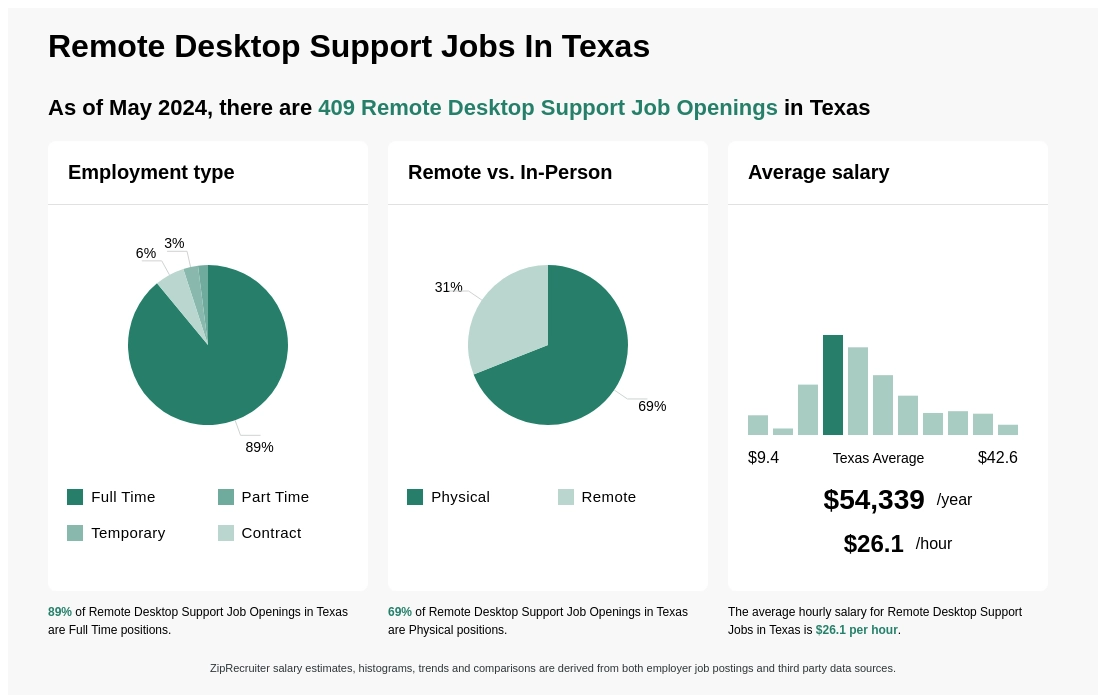
Infographic showing various Remote Desktop Support job openings in Texas as of September 2026, with employment types broken down into 86% Full Time, and 14% Part Time. Highlights an 100% Remote job distribution, with an average salary of $52,313 per year, or $25.2 per hour.

Billingual Remote Client Support Agent - San Antonio, TX

San Antonio, TX • Remote

OneTouch Direct
Marketing • 501 - 1,000 employees

$17 - $22.50/hr

Full-time

Medical, Dental, Vision

Re-posted 24 days ago


OneTouch Direct rating

5.2

Company rating: 5.2 out of 10

Based on 9 frontline employees who took The Breakroom Quiz


Job description

Join OneTouch Direct as a Billingual Remote Client Support Agent, where you will play a key role in delivering exceptional support to our clients. As a premier provider of customer service solutions, we value individuals who are committed to enhancing the customer experience and resolving inquiries with professionalism and empathy.

MUST LIVE IN SAN ANTONIO, TX

Position Overview: In this remote role, you will assist clients by providing timely and effective responses to their questions and concerns. Your goal will be to ensure customer satisfaction through excellent communication and problem-solving skills.

Key Responsibilities:

  • Respond to incoming customer inquiries via phone, email, and chat.
  • Demonstrate a thorough understanding of our products and services to effectively address client needs.
  • Provide solutions to problems while ensuring a positive customer experience.
  • Maintain accurate documentation of all client interactions.
  • Work collaboratively with team members to continuously improve service delivery.

Requirements

  • Minimum of 1-2 years of experience in customer service or support.
  • Must be fluent in both English and Spanish
  • Exceptional verbal and written communication skills.
  • Familiarity with CRM software and customer support tools.
  • Ability to work efficiently in a remote setting with minimal supervision.
  • Strong analytical and problem-solving abilities.
  • Must be available to work flexible hours, including potential evenings and weekends.

Technical Requirements:

  • Must have a reliable desktop or laptop computer running Windows 11.
  • High-speed wired internet connection is required.
  • USB headset with noise-canceling capability (wireless headsets are not acceptable).
  • Webcam (built-in or external) is necessary for video interactions.

Benefits

  • Full time. 40 hours per week schedule with overtime opportunities!
  • Great pay. Hourly base salary + benefits!
  • Training. Paid training & development
  • Benefits. Health Care Plan (Medical, Dental & Vision)
  • Culture. Diverse, welcoming culture with Employee Resource Groups and positive upbeat work environment

What OneTouch Direct employees say

Pay

Hours and flexibility

Workplace

Get the full story on Breakroom