1

Desktop Support Technician Jobs (NOW HIRING)

Desktop Support Technician

Saint Paul, MN ยท On-site

$20.50 - $26/hr

Job Title Desktop Support Technician Location Saint Paul, Minnesota (Onsite) Job Type Full-time | 40 hours per week | Monday-Friday (8:00 AM - 4:30 PM) Number of Positions 1 Job Overview We are ...

Desktop Support Technician

Newport News, VA ยท On-site

$18.50 - $23.50/hr

The Desktop Support Technician will also troubleshoot problem areas in a timely and accurate fashion and provide end user training and assistance where required. Essential Functions, Duties, and ...

We are seeking a full-time Desktop Support Technician to support and maintain computer systems, desktops, software, hardware, and peripheral equipment. This position is responsible for installing ...

DESKTOP SUPPORT TECHNICIAN Department: GENERAL Employment Type: Full Time Location: BOSTON, MA Reporting To: IT MANAGER Compensation: $55,000 / year Description We are seeking a motivated Desktop ...

Desktop Support Technician

Chicago, IL ยท On-site

$50K - $55K/yr

Insight Hospital is seeking a dedicated Desktop Support Technician to join our IT team. The Desktop Support Technician will play a critical role in providing technical support and assistance to our ...

Desktop Support Technician

Salem, OR ยท On-site

$20 - $35/hr

Desktop Support Technician Location: Salem, OR Duration: 12/01/2025 - 05/29/2026 Overview: We are seeking an experienced Desktop Support Technician to provide comprehensive technical assistance to ...

Showing results 21-40

Desktop Support Technician information

See salary details

$13

$22

$32

How much do desktop support technician jobs pay per hour?

As of Aug 17, 2026, the average hourly pay for desktop support technician in the United States is $22.96, according to ZipRecruiter salary data. Most workers in this role earn between $19.47 and $24.76 per hour, depending on experience, location, and employer.

What is a desktop support technician?

Desktop Support Technicians are IT professionals responsible for providing technical support and troubleshooting services to end users, typically within an organization. They install, maintain, and repair computer hardware, software, and peripherals, ensuring that employees can work efficiently. In addition to resolving technical issues, they may assist with system upgrades, security updates, and user training. Their goal is to minimize downtime and keep all computer systems running smoothly.

What are the key skills and qualifications needed to thrive as a desktop support technician?

To thrive as a Desktop Support Technician, you need solid knowledge of computer hardware, operating systems, networking basics, and troubleshooting techniques, typically backed by an associate degree or relevant certifications like CompTIA A+ or Microsoft Certified: Modern Desktop Administrator Associate. Familiarity with remote desktop tools, ticketing systems, and common office software is essential for resolving technical issues efficiently. Strong communication, patience, and problem-solving skills help you effectively assist end-users and manage multiple support requests. These abilities ensure timely and effective technical support, minimizing downtime and boosting productivity across the organization.

What are some common challenges faced by desktop support technicians, and how can they effectively manage these situations?

Desktop Support Technicians often encounter challenges such as troubleshooting a wide variety of hardware and software issues, managing time-sensitive requests from multiple users, and clearly communicating technical solutions to non-technical staff. To effectively manage these situations, it's important to prioritize tickets based on urgency, maintain clear documentation, and develop strong interpersonal skills for user support. Staying up-to-date with the latest technology trends and collaborating closely with other IT team members also helps in resolving complex issues efficiently.

What is the difference between Desktop Support Technician vs Help Desk Technician?

AspectDesktop Support TechnicianHelp Desk Technician
CertificationsCompTIA A+, Network+CompTIA A+, ITIL
Work EnvironmentOn-site, hands-on support for hardware/software issuesRemote or on-site, troubleshooting user issues
Employer & Industry UsageIT departments in various industries, corporate settingsCustomer service centers, IT support teams
Common Search/ComparisonYesYes

Both roles involve supporting users with IT issues, but Desktop Support Technicians typically handle hands-on hardware and software troubleshooting on-site, while Help Desk Technicians often provide remote support and focus on user assistance. The roles overlap in certifications and industry usage, making them closely related but distinct in daily tasks.

What cities are hiring for Desktop Support Technician jobs?

Cities with the most Desktop Support Technician job openings:

Who are the top companies hiring for Desktop Support Technician jobs?

The top employers for Desktop Support Technician jobs are:

What states have the most Desktop Support Technician jobs?

States with the most job openings for Desktop Support Technician jobs include:

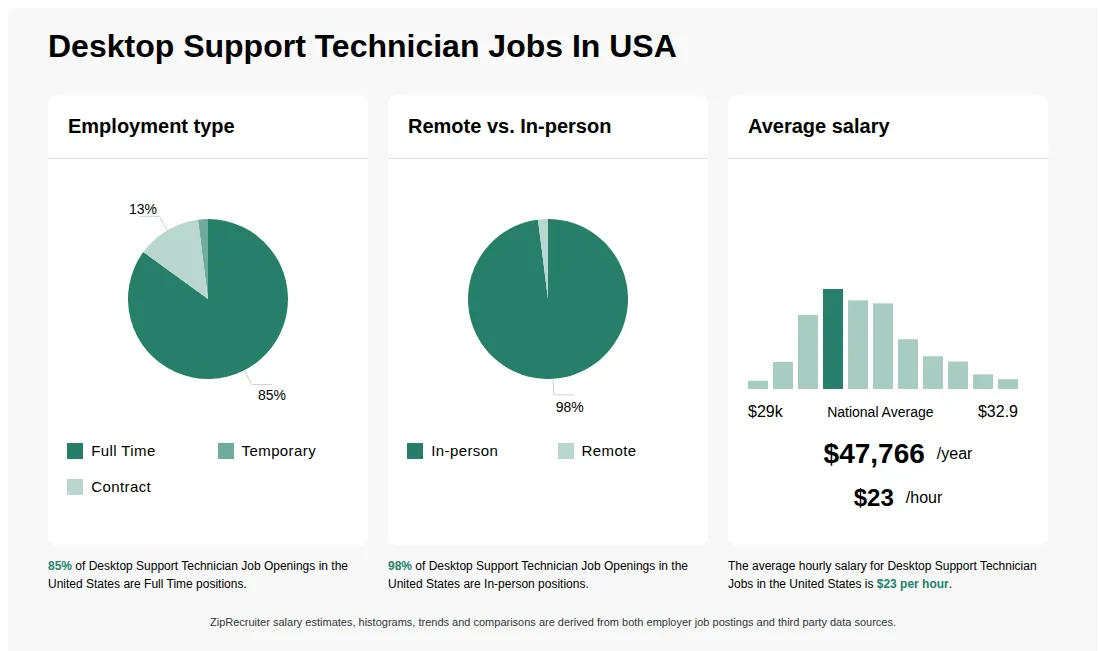
Infographic showing various Desktop Support Technician job openings in the United States as of August 2026, with employment types broken down into 1% As Needed, 72% Full Time, 22% Part Time, and 5% Contract. Highlights an 91% Physical, 2% Hybrid, and 7% Remote job distribution, with an average salary of $47,766 per year, or $23 per hour.

Desktop Support Technician

Artius Solutions

Saint Paul, MN โ€ข On-site

$20.50 - $26/hr

Full-time

Re-posted 20 days ago


Job description

Job Title

Desktop Support Technician

Location

Saint Paul, Minnesota (Onsite)

Job Type

Full-time | 40 hours per week | Monday–Friday (8:00 AM – 4:30 PM)

Number of Positions

1

Job Overview

We are seeking an experienced Desktop Support Technician to deliver professional, timely, and effective technical support in a fast-paced enterprise environment. This role involves end-user support, device lifecycle management, troubleshooting, and assisting with enterprise applications, including Microsoft 365 and modern device management platforms. Candidates with healthcare or other high-urgency environment experience will be highly valued.

Responsibilities

  • Provide support for workstations, software, applications, and peripherals in a Microsoft-based environment.

  • Perform installation, configuration, diagnosis, repair, and upgrades for PC hardware and related equipment.

  • Manage device lifecycle including imaging, deployments, break/fix issues, and hardware/software upgrades.

  • Troubleshoot hardware, software, network, and application problems using structured methods without relying on reimaging.

  • Support Microsoft 365 Suite (Outlook, Teams, OneDrive, OneNote, SharePoint, browsers).

  • Provide support for AV systems, VOIP/cellular phones, scanners, tablets/iPads, and certain medical devices.

  • Guide and train users, ensuring clear communication with both technical and non-technical stakeholders.

  • Prioritize workload based on ticket urgency, impact on operations, and business needs.

  • Maintain professionalism under frequent interruptions and in high-pressure environments.

  • Work independently with minimal supervision, ensuring accurate documentation of tasks and resolutions.

  • Demonstrate strong organizational skills, initiative, and follow-through on all assignments.

Required Skills & Experience

  • 5+ years of enterprise-level desktop engineering and technical support experience.

  • Proven experience with imaging, deployments, and break/fix support in enterprise environments (Windows 10/11).

  • Hands-on expertise with Intune / Modern MDM, including app deployment, compliance, and AD integration. SCCM experience is a plus.

  • Strong technical knowledge of Microsoft 365 Suite.

  • Ability to troubleshoot complex issues across hardware, software, and networks.

  • Experience with AV equipment, VOIP, tablets/iPads, and peripheral support.

  • Effective communication skills with both technical and non-technical users.

  • Familiarity with supporting high-urgency or healthcare environments.

Preferred Qualifications

  • Industry certifications such as CompTIA A+, MCP, or Microsoft Certified Desktop Support Technician.

Additional Details

  • Must be able to travel occasionally to other Minnesota-based locations.

  • Onsite role based in Saint Paul, MN.

.