
Louis, MO Need GC and USC Top Three Skills: 1. Powershell - this tool is utilized to help automate the process. 2. Visual Basic Scripting 3. SQL (intermediate skills are needed in this area). Right ...
Louis, MO Need GC and USC Top Three Skills: 1. Powershell - this tool is utilized to help automate the process. 2. Visual Basic Scripting 3. SQL (intermediate skills are needed in this area). Right ...

Python / Powershell scripting / Automation
Austin, TX · On-site
$45.50 - $60.25/hr
Python / PowerShell scripting / Automation * Understanding of Linux Shell Scripting * Proficient in testing back end, non UI testing * Understanding of Test Manager, TFS * Creating test metrics
Python / Powershell scripting / Automation
Austin, TX · On-site
$45.50 - $60.25/hr
Python / PowerShell scripting / Automation * Understanding of Linux Shell Scripting * Proficient in testing back end, non UI testing * Understanding of Test Manager, TFS * Creating test metrics
TFS Admin + Powershell + MS Release Manager + Some DevOps/CI * At least 4 years of experience in TFS (Team Foundation Server) Admin, Powershell and Microsoft Release Manager * At least 4 years of ...
TFS Admin + Powershell + MS Release Manager + Some DevOps/CI * At least 4 years of experience in TFS (Team Foundation Server) Admin, Powershell and Microsoft Release Manager * At least 4 years of ...
TFS Admin + Powershell + MS Release Manager + Some DevOps/CI * At least 4 years of experience in TFS (Team Foundation Server) Admin, Powershell and Microsoft Release Manager * At least 4 years of ...
TFS Admin + Powershell + MS Release Manager + Some DevOps/CI * At least 4 years of experience in TFS (Team Foundation Server) Admin, Powershell and Microsoft Release Manager * At least 4 years of ...
Python (Powershell scripting & Automation) Consultant
$45.50 - $60.25/hr
Python / PowerShell scripting / Automation * Understanding of Linux Shell Scripting * Proficient in testing back end, nonUI testing * Understanding of Test Manager, TFS * Creating test metrics
Python (Powershell scripting & Automation) Consultant
$45.50 - $60.25/hr
Python / PowerShell scripting / Automation * Understanding of Linux Shell Scripting * Proficient in testing back end, nonUI testing * Understanding of Test Manager, TFS * Creating test metrics

Network Support Analyst- Powershell, python or bash scripting- BS degree required
Philadelphia, PA · On-site
Network Support Analyst- PowerShell, Python, or bash scripting- BS is required Join our dynamic team where innovation and technology meet in the fast-paced world of proprietary trading. As a Network ...
Network Support Analyst- Powershell, python or bash scripting- BS degree required
Philadelphia, PA · On-site
Network Support Analyst- PowerShell, Python, or bash scripting- BS is required Join our dynamic team where innovation and technology meet in the fast-paced world of proprietary trading. As a Network ...
Oracle , PL/SQL PERL , Powershell
$47.75 - $60.25/hr
Preferred At least 6 years of experience of Oracle Powershell, PL/SQL, Perl At least 4 years experience of Design methods and tools, Configuration and Release Management methods and tools, knowledge ...
Oracle , PL/SQL PERL , Powershell
$47.75 - $60.25/hr
Preferred At least 6 years of experience of Oracle Powershell, PL/SQL, Perl At least 4 years experience of Design methods and tools, Configuration and Release Management methods and tools, knowledge ...
TFS Powershell Developer Location: Vienna, VA (Locals or Nearby Only) Duration: 6-12 Months No H1's Developer with Powershell and Team Foundation Server (TFS) We are looking for a resource with ...
TFS Powershell Developer Location: Vienna, VA (Locals or Nearby Only) Duration: 6-12 Months No H1's Developer with Powershell and Team Foundation Server (TFS) We are looking for a resource with ...

Network Support Analyst- Powershell, python or bash scripting- BS degree required
Philadelphia, PA · On-site
$75/hr
Network Support Analyst- PowerShell, Python, or bash scripting- BS is required Join our dynamic team where innovation and technology meet in the fast-paced world of proprietary trading. As a Network ...
Quick apply
Network Support Analyst- Powershell, python or bash scripting- BS degree required
Philadelphia, PA · On-site
$75/hr
Network Support Analyst- PowerShell, Python, or bash scripting- BS is required Join our dynamic team where innovation and technology meet in the fast-paced world of proprietary trading. As a Network ...
Oracle/ PL/SQL Developer (PERL , Powershell ),
$47.75 - $60.25/hr
Preferred At least 6 years of experience of Oracle Powershell, PL/SQL, Perl At least 4 years experience of Design methods and tools, Configuration and Release Management methods and tools, knowledge ...
Oracle/ PL/SQL Developer (PERL , Powershell ),
$47.75 - $60.25/hr
Preferred At least 6 years of experience of Oracle Powershell, PL/SQL, Perl At least 4 years experience of Design methods and tools, Configuration and Release Management methods and tools, knowledge ...

Must be able create PowerShell and other tools to automate a range of tasks in an OS diverse environment. * Strong communication, projects management and documentation skills. Qualifications
Must be able create PowerShell and other tools to automate a range of tasks in an OS diverse environment. * Strong communication, projects management and documentation skills. Qualifications
Oracle/PLSQL Developer with PERL , Powershell ,
$47.75 - $60.25/hr
Preferred At least 6 years of experience of Oracle Powershell, PL/SQL, Perl At least 4 years experience of Design methods and tools, Configuration and Release Management methods and tools, knowledge ...
Oracle/PLSQL Developer with PERL , Powershell ,
$47.75 - $60.25/hr
Preferred At least 6 years of experience of Oracle Powershell, PL/SQL, Perl At least 4 years experience of Design methods and tools, Configuration and Release Management methods and tools, knowledge ...
Oracle/PLSQL Developer with PERL , Powershell ,
$47.75 - $60.25/hr
Preferred At least 6 years of experience of Oracle Powershell, PL/SQL, Perl At least 4 years experience of Design methods and tools, Configuration and Release Management methods and tools, knowledge ...
Oracle/PLSQL Developer with PERL , Powershell ,
$47.75 - $60.25/hr
Preferred At least 6 years of experience of Oracle Powershell, PL/SQL, Perl At least 4 years experience of Design methods and tools, Configuration and Release Management methods and tools, knowledge ...

This consultant will focus on VMware Appstacks, Windows, PowerShell, desktop engineering, VDI, Vmware UEM/DEM, etc. Responsibilities: * Package and deploy applications for the end user environment ...
This consultant will focus on VMware Appstacks, Windows, PowerShell, desktop engineering, VDI, Vmware UEM/DEM, etc. Responsibilities: * Package and deploy applications for the end user environment ...
Oracle/ PL/SQL Developer (PERL , Powershell ),
$47.75 - $60.25/hr
Preferred At least 6 years of experience of Oracle Powershell, PL/SQL, Perl At least 4 years experience of Design methods and tools, Configuration and Release Management methods and tools, knowledge ...
Oracle/ PL/SQL Developer (PERL , Powershell ),
$47.75 - $60.25/hr
Preferred At least 6 years of experience of Oracle Powershell, PL/SQL, Perl At least 4 years experience of Design methods and tools, Configuration and Release Management methods and tools, knowledge ...

Kalamazoo MI_Sr. System Engineer(Powershell scripting ) _w2 only
Kalamazoo, MI · On-site
$98K - $134K/yr
WSUS, RDP gateway, SMTP gateway, internet Proxy are key deliverables Qualifications In-depth knowledge of Windows server 2008R2 and 2012 Expertise with PowerShell scripts Expertise with RDP, WSUS ...
Kalamazoo MI_Sr. System Engineer(Powershell scripting ) _w2 only
Kalamazoo, MI · On-site
$98K - $134K/yr
WSUS, RDP gateway, SMTP gateway, internet Proxy are key deliverables Qualifications In-depth knowledge of Windows server 2008R2 and 2012 Expertise with PowerShell scripts Expertise with RDP, WSUS ...

Advanced PowerShell - using MIMWAL - the MIM Workflow Activity Library as well as using PowerShell for administration * SQL Server Admin - not DBA but need to know how to connect to SQL instances/dbs ...
Advanced PowerShell - using MIMWAL - the MIM Workflow Activity Library as well as using PowerShell for administration * SQL Server Admin - not DBA but need to know how to connect to SQL instances/dbs ...

We are looking to fill a position for IT Service Desk in Columbus OH Qualifications Service Desk, ITIL, SCCM, Powershell, ITSM Additional Information All your information will be kept confidential ...
We are looking to fill a position for IT Service Desk in Columbus OH Qualifications Service Desk, ITIL, SCCM, Powershell, ITSM Additional Information All your information will be kept confidential ...

Need to know scripting languages (especially Powershell) in order to automate some remediation efforts. Need strong leadership, architecture and working across multi-functional team experience.
Need to know scripting languages (especially Powershell) in order to automate some remediation efforts. Need strong leadership, architecture and working across multi-functional team experience.
Company Description 360 IT Professionals is a Software Development Company based in Fremont, California that offers complete technology services in Mobile development, Web development, Cloud ...
Company Description 360 IT Professionals is a Software Development Company based in Fremont, California that offers complete technology services in Mobile development, Web development, Cloud ...
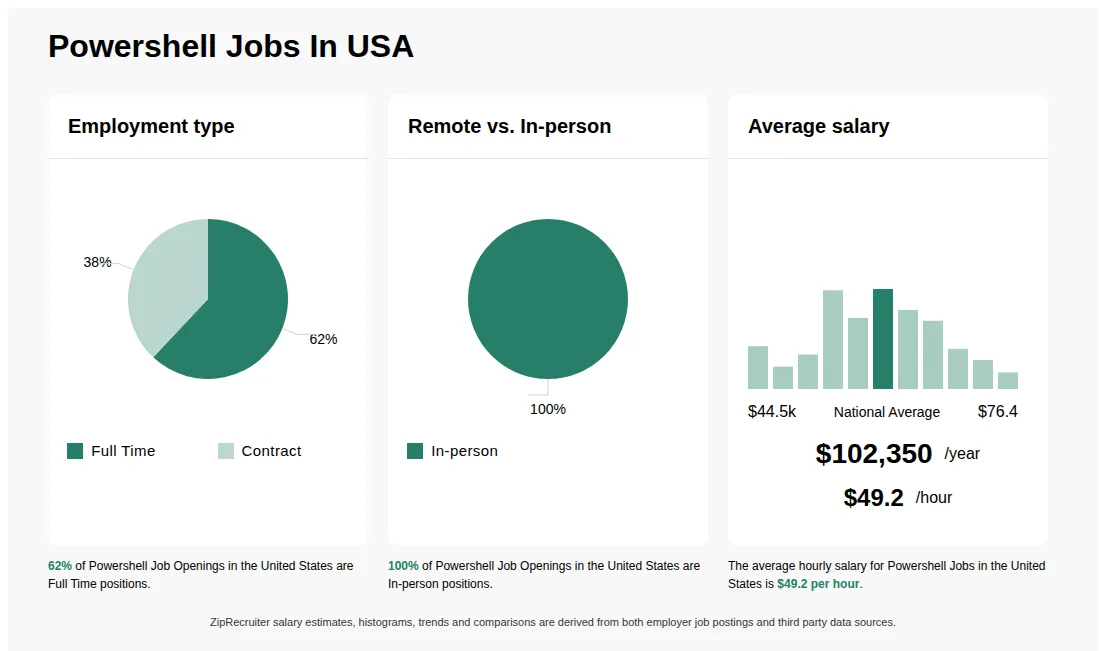
Powershell information
See salary details
$21.39 - $26.40
7% of jobs
$26.40 - $31.40
3% of jobs
$31.40 - $36.41
5% of jobs
$39.07 is the 25th percentile. Wages below this are outliers.
$36.41 - $41.41
17% of jobs
$41.41 - $46.42
12% of jobs
The median wage is $47.98 / hr.
$46.42 - $51.42
17% of jobs
$56.23 is the 75th percentile. Wages above this are outliers.
$51.42 - $56.42
14% of jobs
$56.42 - $61.43
12% of jobs
$61.43 - $66.43
6% of jobs
$66.43 - $71.44
4% of jobs
$71.44 - $76.44
2% of jobs
$21
$49
$76
How much do powershell jobs pay per hour?
As of Jul 22, 2026, the average hourly pay for powershell in the United States is $49.21, according to ZipRecruiter salary data. Most workers in this role earn between $39.18 and $58.17 per hour, depending on experience, location, and employer.
What are PowerShell professionals and what do they do?
PowerShell professionals are IT specialists who use Microsoft's PowerShell scripting language to automate tasks, manage systems, and configure environments, primarily in Windows-based networks. They write, test, and maintain scripts to streamline repetitive processes, improve system efficiency, and ensure consistency across IT operations. Their work often involves managing servers, deploying software, handling user accounts, and troubleshooting issues within enterprise environments. By leveraging PowerShell, these professionals help organizations save time, reduce errors, and improve security in IT management.
What are the key skills and qualifications needed to thrive as a PowerShell Developer, and why are they important?
To thrive as a PowerShell Developer, you need strong scripting skills, a solid understanding of Windows operating systems, and experience with automation, typically supported by relevant IT certifications like Microsoft Certified: Windows Server or Azure certifications. Familiarity with integrated development environments (IDEs) like Visual Studio Code, version control systems such as Git, and automation platforms like Azure DevOps or System Center is essential. Problem-solving abilities, attention to detail, and effective communication are crucial soft skills for interpreting requirements and collaborating with teams. These skills and qualifications are important because they enable the efficient automation of tasks, improve system reliability, and streamline IT operations.
How does a PowerShell professional typically collaborate with other IT team members on automation projects?
PowerShell professionals often work closely with system administrators, DevOps engineers, and network engineers to design and implement automation solutions. They frequently participate in project planning meetings to understand workflow needs and provide scripting expertise. Collaboration involves sharing scripts, integrating with other tools (like Azure or Active Directory), and ensuring that automation aligns with team goals. Regular communication and documenting scripts are essential to ensure that others can maintain or modify the automation as needed.
What is the difference between Powershell vs Bash?
| Aspect | Powershell | Bash |
|---|---|---|
| Primary Use | Automation and configuration management on Windows systems | Shell scripting and automation on Unix/Linux systems |
| Environment | Windows PowerShell, PowerShell Core cross-platform | Unix/Linux terminals and macOS |
| Syntax | Object-oriented, cmdlet-based | Text-based, command-line scripting |
| Common Certifications | Microsoft Certified: PowerShell | Linux Professional Institute Certification (LPIC), Bash scripting courses |
PowerShell and Bash are both powerful scripting tools used for automation, but PowerShell is primarily designed for Windows environments with object-oriented scripting, while Bash is used in Unix/Linux systems with text-based scripting. Their usage depends on the operating system and specific automation needs.
What Is PowerShell?
PowerShell is an open source command-line shell and scripting language created by Microsoft and usable on Windows, macOS, and Linux. This tool allows you to use functions like cmdlets to quickly execute specific tasks within the framework of the system. PowerShell is used mainly for task automation and configuration management, particularly for administrative tasks otherwise considered tedious or repetitive. For example, PowerShell can be used to check whether each server in a group is running a particular program, which is essential for situations like verifying that security systems are functioning as intended. Despite its capabilities, PowerShell is rarely used outside of corporate and administrative environments.
More about Powershell jobs
What cities are hiring for Powershell jobs? Cities with the most Powershell job openings:
What are the most commonly searched types of Powershell jobs? The most popular types of Powershell jobs are:
What states have the most Powershell jobs? States with the most job openings for Powershell jobs include:
What job categories do people searching Powershell jobs look for? The top searched job categories for Powershell jobs are:
Job description
Company Description
Businesses face challenges every day building responsive and agile IT capabilities to grow and stay ahead. Since everyone has access to the same tools, your competitive advantage directly depends on how you apply technology - on the people leading, supporting and optimizing your IT initiatives. USM Business Systems, established in 1999, is an industry-leading private talent management firm, specializing in providing unique IT turnkey solutions, IT staffing solutions, and Talent management insights, enabling you to sustain a truly competitive advantage in this fast-moving environment. USM has offices throughout the US and offshore delivery centers in India. USM is a certified Minority Business Enterprise and is a CMMi Level 3 Organization.
USM is recognized as one of the fastest growing IT Temporary Staffing firms in the US and most recently was ranked #3 on the list of the Top Temporary Staffing firms in the DC Metro Area - Washington Business Journal (2016).
Job Description
Power Shell Consultant
6+ Months
St. Louis, MO
Need GC and USC
Top Three Skills:
1. Powershell - this tool is utilized to help automate the process.
2. Visual Basic Scripting
3. SQL (intermediate skills are needed in this area).
Job Description:
Right now they are supporting the implementation group. The Implementation is gathering lots of unstructured data. Right now there data is in excel spreadsheets and they need someone to look at the data, analyze and put in reasonable structure and put in databases. Also, this person needs to do reporting. They will be assessing - is the data correct or incorrect? Then they will be updating the data and the database. It's not application development.
This team just hired on a candidate with strong SQL development skills and now they need someone that is strong in Powershell and VB Scripting. This person will be taking data and creating forms to creative an interactive form (automating in the database). They will be extracting data from different sources, putting it into a format and uploading it into the database.
They will need intermediate SQL skills and knowing around Excel because data is in Excel. What can we do to automate this as much as possible?
Additional Information
If you are interested in the below position please forward your profile to preethib@usmsystems(dot)com or call me on 703 468 0398.