1

Computer Repair Jobs in Texas (NOW HIRING)

Campus Technician

Fort Worth, TX

$17.50 - $23.25/hr

High school diploma or GED with Three (3) + years of documented computer repair experience Technology Certifications such as CompTIA A+ or others a plus. Experience: Three (3) + years of documented ...

$16 - $27/hr

The role is ideal for individuals interested in technology, computer repair, and hands-on technical support experience in a K-12 educational environment. The Technology Repair Technician works ...

Tech - L1 Depot

Grapevine, TX · On-site

$15.75 - $21/hr

Tech - L1 Depot Description Summary The Computer Technician will be responsible for providing computer diagnostics and repairs. Daily Responsibilities * Take apart and reassemble computer components ...

Tech - Engineer Grapevine, TX Summary The Engineering Technician is responsible for developing and testing solutions to solve technical problems related to all aspects of computer repair. Assists ...

We are currently seeking qualified candidates to fill the role of Electrical Engineer for our computer repair operations. Electrical Engineer Job Responsibilities: * Evaluates electrical systems ...

We are currently seeking qualified candidates to fill the role of Electrical Engineer for our computer repair operations. Electrical Engineer Job Responsibilities: * Evaluates electrical systems ...

We are currently seeking qualified candidates to fill the role of Electrical Engineer for our computer repair operations. Electrical Engineer Job Responsibilities: * Evaluates electrical systems ...

next page

Showing results 1-20

Computer Repair information

See Texas salary details

$12

$18

$28

How much do computer repair jobs pay per hour?

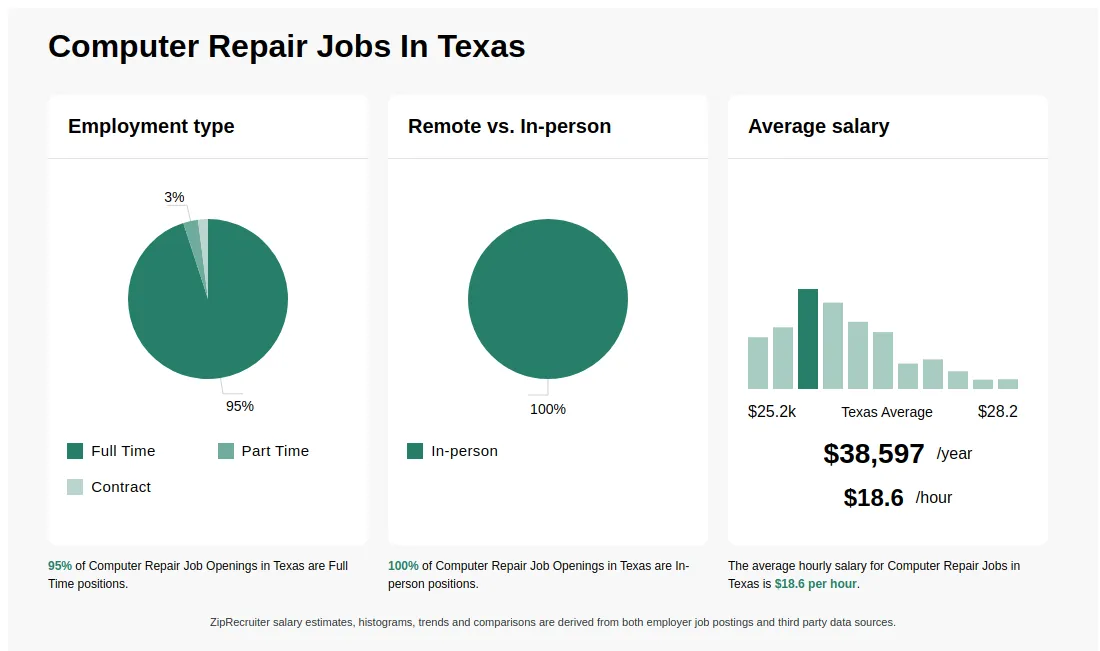
As of Jun 9, 2026, the average hourly pay for computer repair in Texas is $18.56, according to ZipRecruiter salary data. Most workers in this role earn between $15.24 and $20.38 per hour, depending on experience, location, and employer.

What are the key skills and qualifications needed to thrive as a Computer Repair Technician, and why are they important?

To thrive as a Computer Repair Technician, you need a solid understanding of computer hardware, operating systems, troubleshooting, and often a relevant certification like CompTIA A+ or similar. Familiarity with diagnostic tools, repair software, and hardware replacement procedures is typically required. Strong customer service skills, attention to detail, and patience help technicians communicate effectively and resolve issues efficiently. These skills and qualities are vital for accurately diagnosing problems, providing reliable solutions, and ensuring customer satisfaction.

What are some common challenges faced by computer repair technicians when diagnosing hardware issues?

Computer repair technicians often encounter challenges such as distinguishing between hardware and software problems, especially when symptoms overlap. Diagnosing intermittent hardware failures, like faulty RAM or failing hard drives, can also be tricky as these issues may not appear consistently. Additionally, working with a wide variety of makes and models requires technicians to stay current with new technology and troubleshooting techniques. Clear communication with clients to explain technical issues and manage expectations is another important aspect of the role.

What is a computer repair technician?

A computer repair technician is a professional who diagnoses, troubleshoots, and repairs hardware and software issues in computers. They may work with desktops, laptops, and sometimes mobile devices, addressing problems such as malfunctioning components, viruses, and software errors. Technicians may also perform routine maintenance, install new hardware or software, and provide technical support to users. Their work is essential for ensuring that computers run efficiently and securely.

What is the difference between Computer Repair vs IT Support Specialist?

AspectComputer RepairIT Support Specialist
CertificationsA+ Certification, CompTIA certificationsCompTIA A+, Network+, Microsoft certifications
Work EnvironmentRepair shops, service centers, on-siteCorporate offices, help desks, remote support
Job FocusHardware repairs, troubleshooting, component replacementSoftware issues, network setup, user support
Industry UsageConsumer electronics, small repair businessesIT departments, managed service providers

Computer Repair primarily focuses on fixing hardware problems and replacing components, often working directly with physical devices. IT Support Specialists handle a broader range of technical issues, including software troubleshooting, network configuration, and user assistance. While both roles require technical certifications and may work in similar environments, their core responsibilities differ, with Computer Repair centered on hardware and IT Support on software and network support.

What jobs make $3,000 a month without a degree?

In the computer repair field, experienced technicians or freelance repair specialists can earn around $3,000 per month by providing services such as hardware troubleshooting, virus removal, and system upgrades. Building skills in networking, hardware components, and customer service can help increase earning potential without formal degrees, especially for those working independently or in small businesses.
What are the most commonly searched types of Computer Repair jobs in Texas? The most popular types of Computer Repair jobs in Texas are:
What cities in Texas are hiring for Computer Repair jobs? Cities in Texas with the most Computer Repair job openings:
Infographic showing various Computer Repair job openings in Texas as of May 2026, with employment types broken down into 83% Full Time, and 17% Part Time. Highlights an 100% In-person job distribution, with an average salary of $38,597 per year, or $18.6 per hour.
Campus Technician

$17.50 - $23.25/hr

Other

Posted 24 days ago


Job description

Job Description:

Perform on-site technical work to install and maintain computer equipment and network and software applications throughout the district. Respond to work order requests by diagnosing and repairing 
network and computer software and hardware. Troubleshoot and fix a myriad of first level computer issues including but not limited to computer workstations, mobile devices, printers, interactive 
panels/TV systems, etc.

Qualifications: Education/Certification:
   High school diploma or GED with Three (3) + years of documented computer repair experience
   Technology Certifications such as CompTIA A+ or others a plus.

Experience:
    Three (3) + years of documented work experience installing, maintaining, and repairing computers and peripherals in an enterprise network or K-12 education environment.

Special Knowledge/Skills:

    Very strong customer service skills are a must.
    Knowledge of desktop and mobile computer imaging and deployment.
    Knowledge of warranty and out-of-warranty desktop and mobile computer repair.
    Knowledge of computer hardware and software applications and installation processes.
    Knowledge of operating systems including: Microsoft Windows, Chrome OS, Mac OS & iOS.
    Knowledge of device management platforms including: Microsoft Intune, Google Admin Console & Active Directory
    Ability to detect, troubleshoot, and resolve problems in hardware and application software.
    Ability to install, maintain, and repair computers and associated peripherals.
    Knowledge of interactive panels or interactive whiteboard technology.
    A basic understanding of TCP/IP networks.
    Ability to troubleshoot and correct network connectivity issues.
    Ability to communicate issues with customers in plain, non-jargon terms.
    Ability to work as part of a team or independently as required to solve a problem.
    Ability to learn and utilize the District's helpdesk system to receive, and document repair issues.
    Strong organizational and interpersonal skills.
    Detailed oriented.
    Self-motivated and open to a variety of assignments.
    Problem solving and analytical skills.
Major Responsibilities and Duties: Documentation:


1.    Organizing and structuring information in a clear and concise manner.
2.    Writing and editing technical documents, such as user manuals, troubleshooting guides, and installation instructions.
3.    Creating visual aids, such as diagrams and flowcharts, to help users understand complex concepts.
4.    Reviewing and revising documents as needed to ensure accuracy and clarity.
5.    Managing the organization's documentation, including organizing and storing documents and making them accessible to users.


Installation:

1.     Work individually or as part of a project team to install and upgrade computers and peripherals and record inventory and location data throughout the district.
2.     Install and configure software as needed on desktop or mobile computers. 

3.     Connect computers to Active Directory.
4.     Relocate computer hardware, peripherals, and equipment as requested including file migration as necessary.
5.     Contribute as a team member to the items necessary to provide a complete image for specific models of a computer to be deployed.

Equipment Repair and Maintenance:

1.    Diagnose and repair desktop and mobile computing equipment as well as printers, POS terminals, iPads, and other devices as required.
2.    Service equipment according to established preventive maintenance schedule.
3.    Assist with the troubleshooting, repair and/or escalation of Level 1 network connectivity issues.
4.    Maintain accurate updated records of preventive maintenance.
5.    Maintain accurate records of time and materials required to perform repairs and service.
6.    Provide technical assistance to end-users.
7.    Assist with inventory at time of delivery or as assigned for hardware and/or peripherals.
8.    Assist campus staff and administration with the upkeep and integrity of carts and other devices.


Safety:

1.    Operate tools and equipment according to prescribed safety procedures.
2.    Follow established safety procedures and techniques to perform job duties, including:lifting, climbing, and carrying.
3.    Immediately report any unsafe working conditions to your supervisor.
4.    Maintain an organized and orderly work area and assigned service vehicle.


Other:

1.    Respond to after-hours emergencies as necessary and assigned.
2.    Acknowledge and prioritize work orders as they come in on the helpdesk system.
3.    Document work required to solve helpdesk tickets for future reference.

4.    Ensure confidentiality of staff and student data per the requirements established by federal and state law, State Board of Education rule, and local board policy.
5.    Participate in staff development, faculty meetings, and special events as needed.
6.    Be punctual in all areas.
7.    Maintain a positive attitude.
8.    Perform other duties as assigned by the supervisor.


Supervisory Responsibilities:
None

Equipment Used:
Hand tools and test instruments for electronic repairs and cable installations. Personal computers and peripherals, including modems and printers.

Working Conditions:

Mental Demands/Physical Demands/Environmental Factors:

Climbing, stooping, bending, lifting, and kneeling; frequent use of small hand tools and electronic test equipment; frequent district wide travel. Occasional prolonged and irregular hours. May be 
required to be on-call 24 hours a day.

The foregoing statements describe the general purpose and responsibilities assigned to this job and are not an exhaustive list of all responsibilities and duties that may be assigned or skills that 
may be required.
Â