1

Word Document Pdf Conversion Jobs (NOW HIRING)

Content Writer

Nashville, TN · On-site

$30 - $33/hr

Advanced Microsoft Word accessibility, including Styles, Headings, Lists, Tables, Hyperlinks, Images, Document Properties, and accessible PDF conversion. * Adobe Acrobat Pro accessibility remediation ...

Conduct comprehensive document review, editing, and formatting in Word and PDF, ensuring adherence to industry and client-specific standards. * Manage tracked changes, comments, and version control ...

Word Processor

Dallas, TX · On-site

$41K - $46K/yr

Convert Adobe PDFs to MS Word documents (and vice versa), using firm-issued conversion software ... Revise MS Word documents from handwritten copies (often sent via PDF) or via track changes.

Advanced Microsoft Word accessibility, including Styles, Headings, Lists, Tables, Hyperlinks, Images, Document Properties, and accessible PDF conversion. Adobe Acrobat Pro accessibility remediation ...

Advanced Microsoft Word accessibility, including Styles, Headings, Lists, Tables, Hyperlinks, Images, Document Properties, and accessible PDF conversion. * Adobe Acrobat Pro accessibility remediation ...

Utilize Adobe Acrobat Pro for PDF conversion, editing, OCR, Bates numbering, file management, and ... Minimum 3 years of document production or word processing experience. * Typing speed of 50+ words ...

next page

Showing results 1-20

Word Document Pdf Conversion information

See salary details

$26

$29

$31

How much do word document pdf conversion jobs pay per hour?

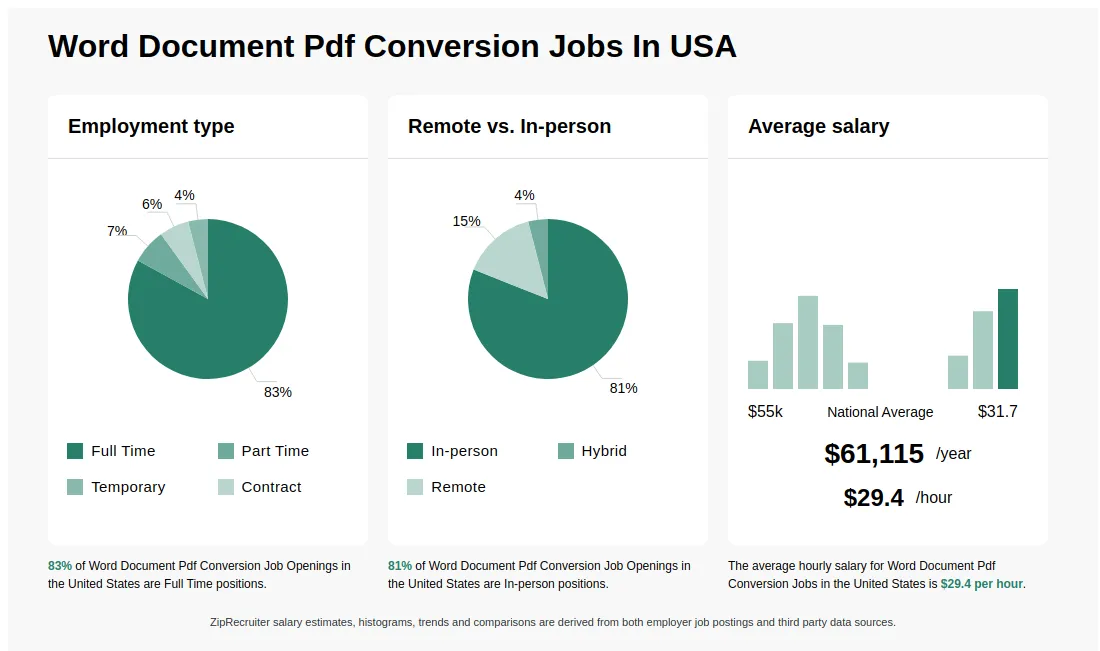
As of Sep 9, 2026, the average hourly pay for word document pdf conversion in the United States is $29.38, according to ZipRecruiter salary data. Most workers in this role earn between $27.40 and $31.25 per hour, depending on experience, location, and employer.

What is Word document to PDF conversion?

Word document to PDF conversion is the process of transforming a file created in Microsoft Word (.doc or .docx) into a Portable Document Format (.pdf) file. This conversion is often done to preserve the formatting and layout of the original document, making it easier to share and view on any device. PDF files are commonly used because they are secure, widely compatible, and maintain the integrity of the document across different platforms. Many tools, including Microsoft Word itself, online converters, and specialized software, can perform this conversion quickly and efficiently.

What are some common challenges faced when converting Word documents to PDFs, and how can they be addressed?

A frequent challenge in Word to PDF conversion is ensuring that formatting, fonts, and embedded elements (like images and tables) remain consistent in the final PDF. Differences in software versions or missing fonts can sometimes cause layout discrepancies. To address these issues, it's best to use the 'Save as PDF' feature within Microsoft Word, verify all formatting after conversion, and embed fonts when saving. Additionally, regularly updating your software and reviewing the PDF for accuracy before sharing are important best practices.

What are the key skills and qualifications needed to thrive in word document pdf conversion, and why are they important?

To excel in Word Document PDF Conversion, you need a solid understanding of document formatting, attention to detail, and proficiency with Microsoft Word and PDF software. Familiarity with tools like Adobe Acrobat and Microsoft Office, as well as knowledge of file management systems, is often required. Strong organizational skills, patience, and clear communication help ensure accuracy and efficient workflow. These abilities are crucial for maintaining document integrity and meeting quality standards in professional environments.

What is the difference between Word Document Pdf Conversion vs Data Entry Specialist?

AspectWord Document Pdf ConversionData Entry Specialist
Primary RoleConverting Word documents to PDF formatInputting and managing data in various formats
Skills NeededProficiency in MS Word, PDF tools, attention to detailTyping speed, accuracy, data management skills
Work EnvironmentOffice or remote, focused on document formattingOffice or remote, data handling tasks
Industry UsageLegal, administrative, publishingHealthcare, finance, administrative sectors

While both roles involve working with digital documents, Word Document Pdf Conversion focuses on converting and formatting files, whereas Data Entry Specialists handle large volumes of data input and management. Understanding these differences helps in selecting the right service or career path.

What other helpful pages are available for Word Document Pdf Conversion?

Other pages related to Word Document Pdf Conversion:

Infographic showing various Word Document Pdf Conversion job openings in the United States as of September 2026, with employment types broken down into 77% Full Time, 8% Part Time, and 15% Contract. Highlights an 85% In-person, and 15% Remote job distribution, with an average salary of $61,115 per year, or $29.4 per hour.

Word Processing Resource Center Day Shift-Remote

Ardsley, NY • Remote

The O'Neil Search Group
Recruiting and Staffing Services • 1 - 10 employees

$44K - $49K/yr

Full-time

Re-posted 15 days ago


Job description

Top global law firm is seeking a Word Processing operator. Position is remote.

Minimum of five years’ experience in a legal Word Processing Center

Advanced proficiency in Microsoft Word, Excel, PowerPoint, Adobe, and Outlook.

Candidates must be able to work the following schedule:

Friday: 10:00 a.m. – 8:00 p.m.

Saturday: 8:30 a.m. – 6:30 p.m.

Sunday: 8:30 a.m. – 6:30 p.m.

Monday: 10:00 a.m. – 7:30 p.m.


Key Responsibilities:

  • Convert Adobe PDFs to MS Word and vice versa using firm-issued software.
  • Clean and format Word documents, including applying styles and cross-referencing.
  • Generate tables of contents and authorities.
  • Revise Word documents from handwritten copies or via track changes.
  • Create labels and letters using Word’s mail-merge feature.
  • Select appropriate pleading templates for discovery responses.
  • Compile, edit, and create PDFs with internal/external hyperlinking.
  • Create bookmarked e-binders, and prepare Adobe forms
  • Apply PDF redactions, headers, footers, and bates stamping.
  • Generate comparisons using MS Word or Litera Compare.
  • Process DocuSign packets.
  • Ensure accuracy and quality of all work products.
  • Create and format PowerPoint presentations using firm-branded templates.
  • Create and revise diagrams, tables, and organizational charts.
  • Assist with marketing materials including proposals, face sheets, and placemats.
  • Create and update Excel spreadsheets using filters, formulas and data analysis tools.
  • Build pivot and structured tables.
  • Format spreadsheets for printing or PDF conversion.
  • Transcribe audio files using Olympus software.
  • Stay updated on firm technology and software advancements.
  • Participate in mandatory training sessions, pilot programs, and testing initiatives.
  • Maintain a secure and distraction-free working environment.
  • Provide assistance to administrative and legal staff across the firm.
  • Remain accessible and engage professionally with all levels of personnel.
  • Handle firm content with discretion and privacy.
  • Screen, prioritize, and delegate assignments to exceed expectations and meet deadlines.
  • Manage resource allocation and assist with scheduling.
  • Supervise and support team members; serve as liaison between team and requestors.
  • Ensure compliance with operational procedures.
  • Monitor productivity and quality standards.
  • Maintain accurate records using the ServiceNow tracking system.
  • Troubleshoot software issues, including providing impromptu training as needed.
  • Contribute equitably to the workload.
  • Attend regular staff meetings.
  • Exercise confidentiality in sensitive matters.
  • Promptly answer and manage department and after-hours calls.


Qualifications:

  • High school diploma or equivalent required.
  • Minimum of five years’ experience in a legal Word Processing Center environment.
  • Advanced proficiency in Microsoft Word, Excel, PowerPoint, Adobe, and Outlook.
  • Familiarity with iManage Work or similar document management systems.
  • Experience or knowledge of Photoshop, Visio, DocXtools, Workday, and DocuSign is a plus.
  • Strong organizational skills, attention to detail, and the ability to manage multiple projects and deadlines.
  • Ability to work collaboratively in a fast-paced, high-volume environment.


ONeil Search Group logo

About ONeil Search Group

Sourced by ZipRecruiter

Since 1989, The ONeil Search Group has been trusted by the nation’s top tier law firms, financial corporations, mid-sized and specialty boutiques to provide capable, professional employees. With over 50 years of combined experience, our search consultants bring an abundance of connections, intelligence and acumen to their jobs. Furthermore, at The ONeil Search Group, we use a team approach. We share resources and advice so that our clients and our applicants get the best of everything we have to offer. Our dedication and commitment to your satisfaction has earned us an excellent reputation in the recruiting, legal and financial communities. Whether you are an applicant or a client, the ONeil Search team is devoted to fulfilling your unique, specific needs.

Industry

Recruiting and staffing services

Company size

1 - 10 Employees

Headquarters location

NY, US

Year founded

1989