 Do you want to control who can upgrade your ZipRecruiter subscription? How about which team members can purchase Monster or CareerBuilder postings?
Our new advanced user roles will let you do that and more.
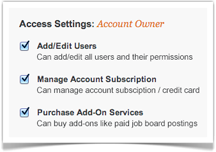
From now on, each user on your hiring team can fall into one of two roles: “Account Owner” or “Restricted Access.” Account owners have full account privileges, while restricted access users are not permitted to do one or more of the following:
- Add/Edit Users: This includes creating new users and modifying settings of existing users
- Manage Account Subscription: This includes modifying the credit card on file, viewing corresponding receipts, and modifying or canceling your subscription
- Purchase Add-On Services: This includes buying premium add-ons like Monster postings and TrafficBoost
To manage user permissions, log into ZipRecruiter, hover over the “Account” tab, and select “Users” from the drop-down menu.
We hope you enjoy the new tiered access. Please let us know if you have comments or questions!