You will notice we have redesigned your My Jobs homepage today. These changes were based on feedback directly from our customers, with the goal of simplifying the page and highlighting commonly-accessed functionality.
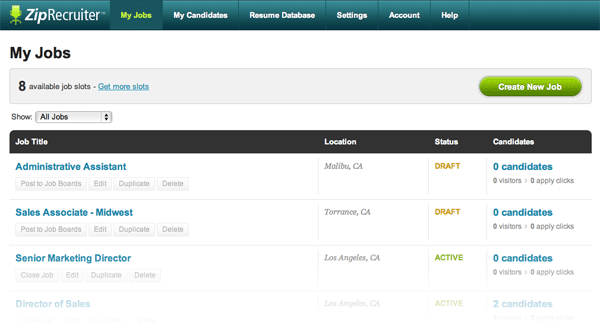
Here is a summary of what we changed:
- Moved the green “Create New Job” button from the main top navigation down into the My Jobs page gray bar header.
- Added a filter so you can find your jobs by status (Active, Draft, and Closed).
- Emphasize the job’s current status along with the candidate count and statistics on the right.
- Removed the blue drop-down arrow “Job Actions” menu in favor of showing the commonly accessed buttons directly below each job title. Now you can easily duplicate, post (and re-post) jobs with one click.
- Increased the job count per-page to 50, and also now display current page and total number of pages.
- Simplified the gray bar at the top of the page to only show pertinent information regarding your subscription.
We hope these changes will make ZipRecruiter even easier to use. Please contact us with any feedback you have!